Quick Answer: How to Learn Python from YouTube
Learn Python from YouTube in four phases, not random tutorials: fundamentals (variables, loops, functions), then intermediate concepts (OOP, APIs, error handling), then one specialization (web, data, or automation), then your own projects. It takes most people three to six months. Writing code and building projects - not watching more videos - is what gets you to job-ready.
Why YouTube Is One of the Best Places to Learn Python
YouTube is one of the best platforms for learning Python in 2026, offering thousands of hours of free tutorials from world-class educators like Corey Schafer, freeCodeCamp, and Sentdex. The quality of free Python content today rivals paid courses on Coursera and Udemy, making it possible to go from beginner to job-ready without spending a dollar.
There has never been a better time to learn Python. The language powers everything from web applications and data science to artificial intelligence and automation. And the best part? You do not need to spend thousands of dollars on a bootcamp or university course to get started.
YouTube hosts thousands of hours of Python tutorials from world-class educators, professional developers, and university professors who share their knowledge freely. Channels like Corey Schafer, Tech With Tim, freeCodeCamp, and Sentdex have helped millions of people go from absolute beginners to confident Python developers. The quality of free content available today rivals - and often surpasses - paid courses on platforms like Udemy or Coursera.
But here is the problem: YouTube was not designed to be a learning management system. There is no curriculum, no structured progression, no quizzes, and no way to track your progress across different videos and channels. You can easily fall into the trap of watching tutorial after tutorial without actually building the skills you need.
That is exactly the problem LearnPath was built to solve - but more on that later. First, let us talk about how to structure your Python learning journey on YouTube for maximum effectiveness.
How to Structure Your Python Learning Journey
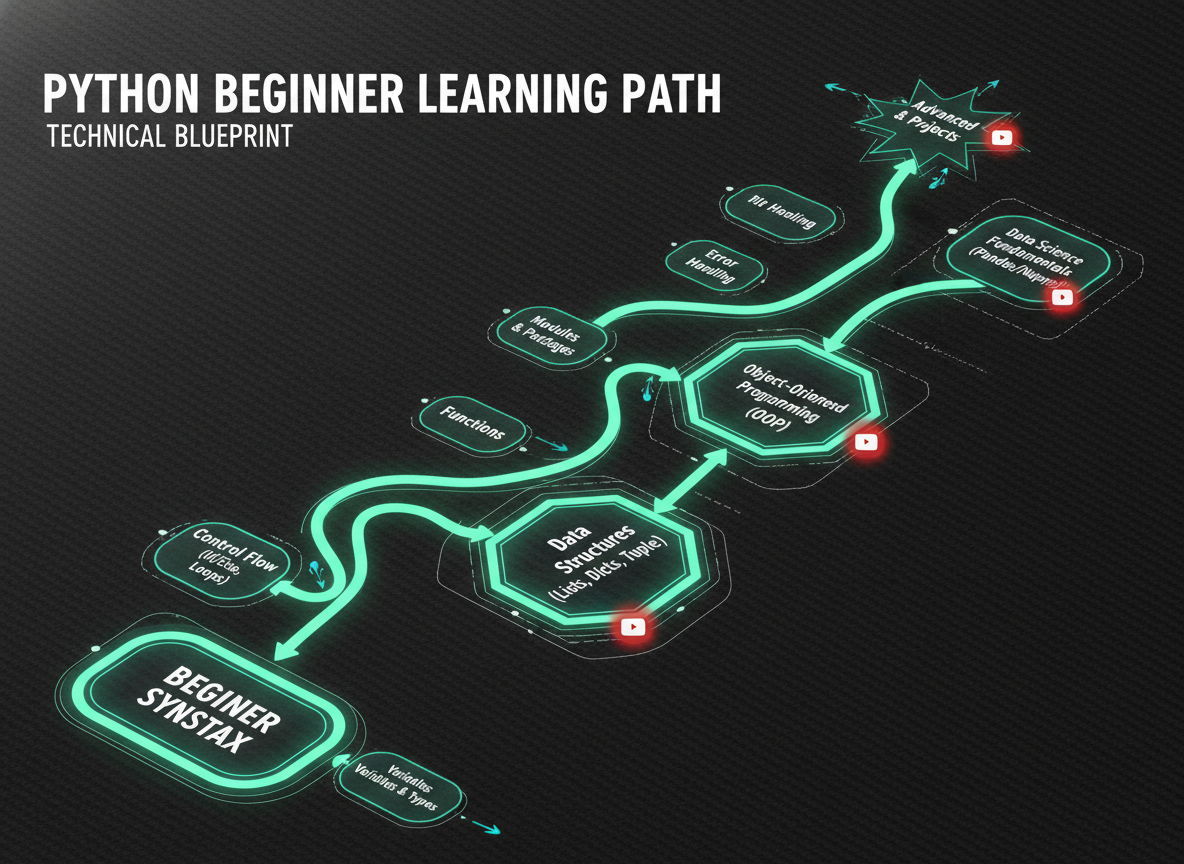
A structured Python learning journey from YouTube takes 3-6 months and follows four phases: fundamentals (variables, loops, functions), intermediate concepts (OOP, APIs, error handling), specialization (web dev, data science, or automation), and project building. Following a clear roadmap prevents tutorial hell and ensures steady progress.
Without a plan, you will waste hours jumping between unrelated videos, rewatching concepts you already know, and never making it past the basics. Here is a structured roadmap that breaks the journey into clear phases.
Phase 1: Python Fundamentals (Weeks 1-3)
Start with the absolute basics. You need to understand the building blocks before you can construct anything meaningful. Focus on these topics in order:
- Variables and data types - strings, integers, floats, booleans
- Basic operators - arithmetic, comparison, logical
- Control flow - if/elif/else statements
- Loops - for loops and while loops
- Functions - defining, calling, parameters, return values
- Data structures - lists, tuples, dictionaries, sets
- String manipulation - slicing, formatting, common methods
- File I/O - reading from and writing to files
Search for videos titled "Python for beginners" or "Python crash course" and look for content that covers these topics sequentially. A single comprehensive tutorial series is better than piecing together videos from different creators at this stage.
Phase 2: Intermediate Concepts (Weeks 4-6)
Once you are comfortable writing basic Python scripts, move into intermediate territory:
- Object-Oriented Programming (OOP) - classes, objects, inheritance, encapsulation
- Error handling - try/except blocks, custom exceptions
- Modules and packages - importing, creating your own modules, pip
- List comprehensions - a Pythonic way to create and filter lists
- Lambda functions and map/filter/reduce
- Decorators and generators
- Working with APIs - using the requests library
- Virtual environments - venv, managing dependencies
This phase is where many self-taught developers hit a wall. OOP in particular can feel abstract when you are learning from videos. The key is to code along with every tutorial and then modify the examples to make them your own.
Phase 3: Choose Your Path (Weeks 7-12)
Python is a general-purpose language, which means you need to specialize. Pick one of these paths based on your goals:
Web Development - Learn Flask or Django to build web applications. Search for project-based tutorials that walk you through building a complete web app from scratch.
Data Science - Learn pandas, NumPy, and matplotlib. Start with data analysis projects using real datasets from Kaggle. Move into machine learning with scikit-learn.
Automation - Learn to automate repetitive tasks with libraries like selenium, beautifulsoup, and schedule. Build scripts that solve real problems in your daily workflow.
Game Development - Learn pygame to build 2D games. This is a fantastic way to practice programming concepts while having fun.
Phase 4: Build Projects (Ongoing)
The most important phase. Stop watching tutorials and start building. Projects force you to solve problems that tutorials never cover - debugging, reading documentation, making architectural decisions, and handling edge cases.
Start with small projects and work your way up:
- A command-line to-do list application
- A web scraper that collects data from a website
- A personal budget tracker with file persistence
- A REST API with Flask
- A data visualization dashboard
- A full-stack web application with user authentication
The 5 Most Common Mistakes When Learning Python from YouTube
After working with thousands of learners, we have identified the patterns that hold people back. Avoid these traps and you will progress significantly faster.
Mistake 1: Tutorial Hell
This is the number one killer of programming progress. Tutorial hell happens when you spend all your time watching videos and never write code on your own. You feel like you are learning because the concepts make sense when someone explains them, but you cannot reproduce the code without the video playing.
The fix: Follow the 70/30 rule. Spend 30 percent of your time watching tutorials and 70 percent of your time writing code. After every video, close the tutorial and try to recreate what you learned from memory. Then build something slightly different using the same concepts.
Mistake 2: Skipping the Fundamentals
It is tempting to jump straight into machine learning or web development because that is the exciting stuff. But without solid fundamentals, you will hit a wall very quickly. You cannot debug a Django application if you do not understand how functions, classes, and dictionaries work.
The fix: Spend at least three weeks on pure Python fundamentals before touching any framework or library. It feels slow, but it saves you months of confusion later.
Mistake 3: Not Coding Along
Watching a Python tutorial without coding along is like watching a cooking show and expecting to know how to cook. Your brain needs the physical act of typing code, making mistakes, and fixing errors to build real programming skills.
The fix: Always have your code editor open next to the video. Pause frequently. Type every line yourself - do not copy and paste. When you make a typo and get an error, celebrate. Debugging is one of the most important skills you are building.
Mistake 4: Learning in Isolation
Programming is not a solo activity. When you learn in isolation, you miss out on different perspectives, code review, and the motivation that comes from being part of a community.
The fix: Join Python communities on Discord, Reddit (r/learnpython is excellent), or Stack Overflow. Share your code. Ask questions. Help others who are a few steps behind you - teaching is one of the best ways to solidify your own understanding.
Mistake 5: No Spaced Repetition
You watch a great video about decorators on Monday and feel like you understand them perfectly. By Friday, you have forgotten most of it. This is completely normal - it is how human memory works. Without regular review, knowledge fades.
The fix: Use spaced repetition to review concepts at increasing intervals. After learning something new, review it the next day, then three days later, then a week later. This is exactly what LearnPath's built-in spaced repetition system does automatically.
How LearnPath Transforms YouTube Learning
YouTube is incredible for free educational content. But it lacks structure, assessment, and personalization. LearnPath bridges that gap by turning YouTube videos into a complete learning experience.
Here is how it works:
AI-Curated Content
When you tell LearnPath you want to learn Python, our AI analyzes hundreds of YouTube videos and selects the best ones for your current skill level. No more scrolling through search results wondering which video is actually good. The AI evaluates video quality, teaching style, content accuracy, and how well each video fits into your personalized curriculum.
Adaptive Learning Paths
LearnPath does not give everyone the same sequence of videos. It builds a branching learning tree that adapts to your performance. If you ace the quiz on loops, the path moves you forward to more advanced topics. If you struggle with functions, the path branches to provide additional explanation and practice before moving on.
Quizzes Generated from Transcripts
After each video, LearnPath generates a quiz based on the actual content you just watched. These are not generic Python questions - they are specific to what was taught in that particular video. This forces active recall, which is one of the most effective learning techniques backed by cognitive science research.
Progress Tracking and Gamification
LearnPath tracks your progress across your entire learning journey. You earn XP for completing videos and quizzes, maintain learning streaks, and can see exactly where you stand in your Python learning path. The gamification elements are designed to keep you motivated through the difficult middle stages where most self-learners give up.
Spaced Repetition Reviews
Concepts you have learned are automatically scheduled for review using the SM-2 spaced repetition algorithm. You will see quiz questions resurface at scientifically optimal intervals to ensure long-term retention. No more forgetting what you learned last month.
Frequently Asked Questions
How long does it take to learn Python from YouTube?
With consistent daily practice of one to two hours, most people can learn Python fundamentals in four to six weeks. Reaching an intermediate level where you can build useful projects typically takes three to six months. Becoming proficient enough for a junior developer role usually takes six to twelve months of dedicated study and project building.
Which YouTube channel is best for learning Python?
There is no single best channel - it depends on your learning style. For beginners, freeCodeCamp offers comprehensive long-form tutorials. Corey Schafer provides clear, well-structured explanations of individual topics. Tech With Tim offers project-based content. Sentdex is excellent for data science and machine learning applications. The ideal approach is to sample a few videos from different creators and pick the one whose teaching style resonates with you.
Can I get a job with Python skills learned from YouTube?
Absolutely. Many professional developers are self-taught using free online resources including YouTube. What matters to employers is your ability to write clean code, solve problems, and demonstrate your skills through a portfolio of projects. Where you learned is far less important than what you can do. However, you need to supplement video tutorials with hands-on project building and practice with coding challenges.
Do I need to learn Python 2 or Python 3?
Python 3 only. Python 2 reached its official end of life in January 2020 and is no longer maintained. All modern tutorials and libraries use Python 3. If you encounter a video that uses Python 2 syntax (like print "hello" instead of print("hello")), skip it and find a more recent tutorial.
How do I stay motivated when learning Python?
Set specific, achievable goals rather than vague ones like "learn Python." Instead, aim for "build a web scraper that collects weather data" or "complete one Python video per day for 30 days." Track your streaks, share your progress with a community, and remember that every professional developer once struggled with the same concepts you are learning now. LearnPath's gamification features - XP, streaks, levels, and certificates - are specifically designed to maintain motivation throughout your learning journey.
Start Your Python Journey Today
Learning Python from YouTube is entirely possible, and thousands of developers have done it successfully. The key is having a structured approach, consistent practice, and the right tools to keep you on track.
If you want to skip the manual curation and get a personalized, adaptive learning path built from the best Python content on YouTube, give LearnPath a try. It is free to start, and the AI handles all the heavy lifting of finding the right videos, generating six types of exercises, and keeping you on the optimal learning trajectory. See how we compare to traditional platforms.
Your future as a Python developer starts with a single video. Make it count.